Google Sites is very easy to use. My 6th, 7th and 8th graders all had a very easy time creating their sites. They were asked to create a site to use as a portfolio for all the work they would complete for the year. In the future they will add a page for their new grade level.
Directions For Using New Google Sites
- Go to Google Sites https://sites.google.com/
- Choose New Google Sites.

- Click on the Plus Sign on the bottom right hand corner to create a new Google Sites.


- Begin by editing your Header. You can easily change the background image and give your site a name.

- It is also easy to give your site a theme, which will change your header by clicking on themes.

- Ready to add Text, images, You Tube Videos, Stuff from Google Drive, or even Embed items on your site? Google Makes it super easy. Just head over to the insert Section of Google Sites Editing.

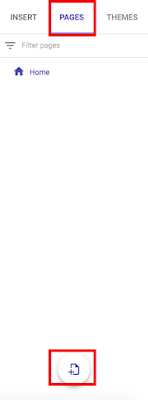
- Need to add a new page. Again this is very easy with Google Sites. Head over to the Pages tab and click on the plus sign located on the bottom right hand edge of the menu.
- Students will need to remember to click on publish in order for all edits to go to the live web version. The first time they publish they will need to add a distinct word or letters to create a URL for their site. I simply had my students add their first initial and last name.
Here are some samples of some of my student's beginning portfolios.


- Students will need to remember to click on publish in order for all edits to go to the live web version. The first time they publish they will need to add a distinct word or letters to create a URL for their site. I simply had my students add their first initial and last name.
Here are some samples of some of my student's beginning portfolios.


Are you doing awesome things with your classes and are looking for a way to showcase this? Consider creating a Digital Portfolio with your students. This is a great way to share with classroom teachers, administrators, and parents. Are you already creating digital portfolios with your students. I would love to hear what you are doing. Please share with me!

No comments:
Post a Comment