Friday, February 9, 2018
Awesome Times at TCEA
This week I had the pleasure of attending and presenting at TCEA (Texas Computer Education Association) Conference in Austin Texas. This was a fabulous conference and I highly recommend attending. Even though it is a state conference, it feels more like a national conference. My husband always says "Everything's Bigger in Texas" and in this case he is most certainly correct.


Some of my highlights of the week included:
1. Presenting to Librarians on My Top 25 Tech Tools For Librarians.
Presenting is one of my favorite things to do, and I always enjoy sharing things that have worked for me, and making new connections.
2. Attending a presentation by Kasey Bell on Google Keep.
I have been following Kasey on Twitter for quite some time now @shakeuplearning and am very impressed with all that she has to offer educators on all areas of Google. I really learned a lot about using Google Keep. It is quickly becoming my new Go To Tool.
3. The Vendor Hall
The vendor hall at TCEA was just amazing! Pretty much every technology vendor was there. Since I have a new Makerspace, and am always looking to expand, the vendor hall always gives me time to explore the newest and up and coming technologies. I was also lucky enough to present for Mackin in the vendor hall on how we used MackinMaker to create our school library makerspace.
4. Hearing Marlee Matlin Keynote
Marlee Matlin was one of TCEA's keynotes and I was so moved by her talk. She spoke of the struggles of becoming an actress with a disability and mentioned many people who were a help to her along her way to success. She ended her speech by explaining what an asset technology has been to those struggling with various disabilities. Such a moving person!
5. Making New Connections
If you have never been to a larger conference, I would recommend you do so soon. I have been to 3 in the past year (ISTE, AASL, and now TCEA) At each of these conferences I have met new educators. You may meet someone if you are presenting, someone who sits next to you at a session you are attending, or someone while you are sitting down taking it all in. It is always a treat for me to talk to new people and learn how they are doing things in their schools.
More information about TCEA can be found at https://www.tcea.org/
Thursday, December 21, 2017
Gingerbread House STE(A)M Competition
 |
| Building in the Makerlab |

The Rules Were as Follows:
- Houses can only be made of paper and crafting materials.
- Houses must be formally entered into the contest to win.
The next thing I had to decide was how the houses would be judged. Should I pick a group of teachers or staff to judge? I decided to give my students a voice by allowing them to vote on their favorite Gingerbread House. Once, all the gingerbread houses were on display in the library, I numbered each house. Students were able to vote once by filling out a ballot with the number of their favorite gingerbread house. The top 3 winners received Amazon gift cards. All winners received a small prize for participating.

I have included some of the items I created for this contest below. Much of what I created was completed using the program Canva. Canva is one of my favorite online tools. I use it for signs, cards. and much more. If you have not used it before, I would recommend it. You will find that it is very easy to use and will make anything you create look fantastic.
This was a highly successful STEM Challenge. Even the students who did not create enjoyed looking at the creations and participating through voting for their favorite. Have you done something similar in your library or classroom? I would love to see pictures and hear about your experiences.
Resources
Gingerbread House Contest Form
Voting Ballots
Thursday, December 14, 2017
Unwrap a Good Book For Christmas
I don't know about you, but I am always looking for awesome reading promotions to do with my students. I teach 5-8, and it can sometimes be a bit challenging to get my 7th and 8th graders excited about reading.
This November, I attended AASL and attended a session on reading promotions at the middle school level. The presenter talked about a reading promotion she ran called Unwrap a Good Book For Christmas. I had done something similar to this last year and Valentine's Day "Blind Date With a Book" and it seemed to go over well, so I thought this would be a perfect fit as well.
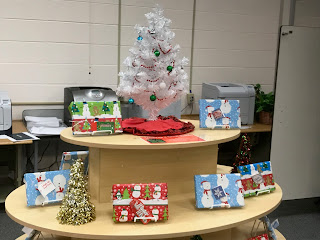
This November, I attended AASL and attended a session on reading promotions at the middle school level. The presenter talked about a reading promotion she ran called Unwrap a Good Book For Christmas. I had done something similar to this last year and Valentine's Day "Blind Date With a Book" and it seemed to go over well, so I thought this would be a perfect fit as well.
Here's How the Promotion Works:
1. Find some awesome books your students would enjoy reading (I picked a bunch of our new books. Books I knew would be awesome reads, but my students hadn't gotten a hold of them yet)
2. Get some gift tags and inexpensive wrapping paper.
3. On the tags write down the barcode number and some hints about the book, such as the book's genre, theme, first line, etc.
4. Wrap the book up.
5. Display them
6. Create a way for your students to tell you about their books. I decided to create a Padlet and have students tell me about their book on there.
7. If you like, give students a little incentive for reading after they complete their mini review. I took a party bag and filled it with candy, erasers, stickers.

My students really are enjoying this reading promotion, and are coming in daily looking for a new book to read. If you are looking for an exciting holiday related reading promotion, this may be the perfect fit.
Monday, December 11, 2017
New Blog Design
Over the past year, I have learned the importance of blogging. It is a great way to share your ideas with others, keep a record of your successes, and make connections with other educators.
About six months ago, I began the process of redesigning my blog. This involved creating a new design for my header. Unfortunately, I have absolutely no artistic skills, at least not when it comes to drawing. My mother is a very talented artist, and even holds a Bachelors in Fine Arts from Moore College of Art in Philadelphia. Who better than her to create a design for my blog? My mother is a huge part of my life and has been an inspiration to me both personally and professionally. I feel blessed to have her in my life. The header symbolizes my love for literature, technology, and design thinking. This school year I was fortunate enough to get funded for a Makerspace. Every day proves to be a learning experience for myself and my students. No matter how challenging the day is, I still always leave my school thinking how much I love our library makerspace.
My blog page was created fully with the help of Christi Fultz of http://www.designbychristi.com/ If you are looking for a blog designer, I would highly recommend Christy. I ended up changing my blog design several times, and she was extremely patient with me, and kept the price the same.
Keeping a blog is challenging, but I highly recommend it. We ask our students to write all the time, but are we writing? My goal for this new blog is to share my ideas, and blog on a regular basis. It is my hope that my posts can inspire educators in the way that I have been inspired by so many of the bloggers that I have followed through the years.
About six months ago, I began the process of redesigning my blog. This involved creating a new design for my header. Unfortunately, I have absolutely no artistic skills, at least not when it comes to drawing. My mother is a very talented artist, and even holds a Bachelors in Fine Arts from Moore College of Art in Philadelphia. Who better than her to create a design for my blog? My mother is a huge part of my life and has been an inspiration to me both personally and professionally. I feel blessed to have her in my life. The header symbolizes my love for literature, technology, and design thinking. This school year I was fortunate enough to get funded for a Makerspace. Every day proves to be a learning experience for myself and my students. No matter how challenging the day is, I still always leave my school thinking how much I love our library makerspace.
My blog page was created fully with the help of Christi Fultz of http://www.designbychristi.com/ If you are looking for a blog designer, I would highly recommend Christy. I ended up changing my blog design several times, and she was extremely patient with me, and kept the price the same.
Keeping a blog is challenging, but I highly recommend it. We ask our students to write all the time, but are we writing? My goal for this new blog is to share my ideas, and blog on a regular basis. It is my hope that my posts can inspire educators in the way that I have been inspired by so many of the bloggers that I have followed through the years.
Friday, November 3, 2017
Creating a Newsletter For Teachers Filled With Curated Resources
Let's face it - many teachers and educators are unaware of all that a librarian can do for them. Many of them still see us as only a book resource. When I first started in my newest library position last December, my principal admitted that I confused him, because he had no idea librarians could do all the things I was doing. We really need to put ourselves out there and say to our other staff members:

Ok, perhaps we don't actually say that, but we do need to find ways to reach the teachers in our school. Hopefully they will find that we can help them make their lessons awesome.

Hey! Pay Attention! I can help you do great things in your classroom!
So where do we start?
This past week I started sharing a weekly newsletter filled with curated resources through Smore. Smore is an awesome program that allows you to add pictures, text and multimedia. The newsletter can be shared and it keeps track of people who have viewed your newsletter.
Now, you may be thinking, "I already create a newsletter" I have a regular library newsletter as well, and have kept this going since last December when I started my position. But this is different. This is a newsletter with resources just for teachers. When I started writing my first newsletter, I decided to limit it to the following:
- websites
- book reviews
- Listings of people and places who Skype
- Databases
- Articles about education
This is meant to be a resource for educators, and teachers in my district can choose to read as much or as little as they like.
Here is a copy of my very first newsletter. I am hoping it brings about many new connections with my staff.
Sunday, October 22, 2017
How I Used Animoto to Create Digital Citizenship Videos

One of the unit I teach my student in Information Literacy is Digital Citizenship. We spend time sharing and discussing netiquette, digital privacy, maintaining a digital footprint, and cyberbullying. I have found that this provides a sounding board for many of my students and we have had some amazing conversations.
More than 90% of my students own a cell phone and most of them are on social media. The issues we are discussing are real and need to be discussed. This is one of the few classes that takes the time to discuss digital citizenship at length. I have found that many of my parents have no idea where to start and some are even unsure about some of the newest social medias like Snapchat.
Last year I decided to not only discuss the issues, but also to spend time creating with technology so students could promote digital citizenship themes through 21st century technologies. Specifically my 7th graders created projects that I am especially proud of. Students created Animoto videos on a digital citizenship topic. Did you know that Animoto offers free accounts to educators and their students. Here is a link with information for getting educator accounts. https://animoto.com/education/classroom My students enjoyed making the videos and were very proud of their finished creations.
Digital Citizenship Animoto Videos
- It was explained to students that they will be making a PSA with Animoto on a specific area of digital citizenship (digital privacy, cyberbullying, keeping a clean digital footprint)
- Students picked a partner and began planning out their video using a storyboard paper.
- Students were instructed on using Animoto, and began creating their video.
- Videos were created using at least 5 slides (most of my students opted to do more)
- Students added their videos to Padlet so we all could share.
Here is the link to the Padlet. Padlet of Digital Citizenship Animotos
Sunday, September 24, 2017
My Journey to Starting a School Library Makerspace: Part 2
When starting a Library Makerspace, one of the most important things to consider is funding. In these times of library budgets getting slashed, many schools simply do not have the funds to invest in the items needed for a Makerspace. It was no different in my school district. Most of my students are middle class or above, so we are not considered to be low poverty. Unfortunately, the library budget is rather low and every cent is needed for library resources. Since we are not low poverty, many of the big grants out there were not available to us. Those are given to the schools that have the highest need (the schools with the highest poverty)

So how does someone get funded for a Makerspace if they are ineligible for need based grants?
Librarians need to tap into their local resources, such as the school's education foundation, the home and school association, and other local grants. Organizations that truly care about your school and students, because they have a vested interest. When I first started working in Shamong, NJ, I knew I wanted to start a Makerspace. I also knew that the funding would need to come outside of my budget. I walked into a library situation that was in desperate need of updating. My entire budget was needed so I could make the necessary updates.
Our district is very blessed, because we have an education foundation who is willing to fund projects that are creative and innovative. When the Spring Grant submissions started, I decided to submit a grant to start our Library Makerspace.
The grant process involved:
- Talking to other teachers who had previously had a project funded through the foundation.
- Doing my homework ahead of time, prior to writing the grant proposal.
- Finding a way to integrate the items requested for the funding, into my curriculum.
- Working with my technology director to plan out purchases for the grant proposal - this included getting pricing for IPads, a 3D printer, and a shelf for the IPads.
- Writing and submitting the grant to the foundation.
- Responding to questions about the grant from the foundation.
The final grant requested $13,307 in materials. I opted for those higher tech items. The items decided upon were based on a survey sent out to students. I wanted the students in my middle school to take ownership of the Makerspace. The items requested were things that were most important to my students. Some of the items we requested were:
- 10 IPads
- Cases for the IPads
- Shelf for the IPads
- 4 Dash and Dot robots
- 4 Sphero Spark robots
- 1 K'nex robot kit
- 4 boxes of legos
- 2 Raspberry Pi
- 1 3D Printer with filament
Here is a copy of the grant request.
I am happy to say that our grant was fully funded, and we were also able to get another grant through the state for an additional $10,000. We have used this money to renovate our once computer lab, and turn it into a Makerspace lab. We have also used the additional money to purchase new furniture for our space, shelving, and additional supplies.

Students enjoying our Makerspace Room.
Subscribe to:
Posts
(Atom)
Popular Posts
-
 Working as a school librarian poses many challenges. One of the biggest challenges is finding a way to get teachers to collaborate with you...
 -
 Last year, another teacher from my district I were lucky enough to get funded through our Education Foundation for six of the Breakout Boxes...
 -
 About four years ago, while attending the PETE&C (Pennsylvania Education Technology Expo and Convention, I found out about Canva for the...
 -
Earlier this month I presented to my teachers about how they can use videoconferencing in the classroom. If you are not using Skype or Goog...
-
 Anyone who knows me, knows I am a huge fan of the Mackin company. I cannot say enough good things about them. They are a wonderful company...
 -
 Are you thinking about starting a Makerspace but have limited funds or just are not quite ready to take the plunge? A great way to get your...
 -
 This week marked my debut in Cherry Hill School District, NJ. I was so happy to welcome Kindergarten to the beautiful media center. The p...
 -
 This was one of those weeks that just flew by! Packed with meetings and busy times with my students. Our Makerspace has been a huge hit wi...
 -
 I have been exploring the world of digital badges for quite some time now. It's a great way to give students a sense of accomplishment ...
 -
This week proved to be a fun but tiring week. After a little over a week off for Winter Break and a four day week following that, five days...